
Trade Settings
**Sparta Tip:** You don't need to change any settings unless you want to. Everything is automated and preset.
Sparta Terminal Settings Guide
Access the Settings Dashboard by typing navigating to the Settings page on the Terminal. Explore all the customizable options that impact your trades.
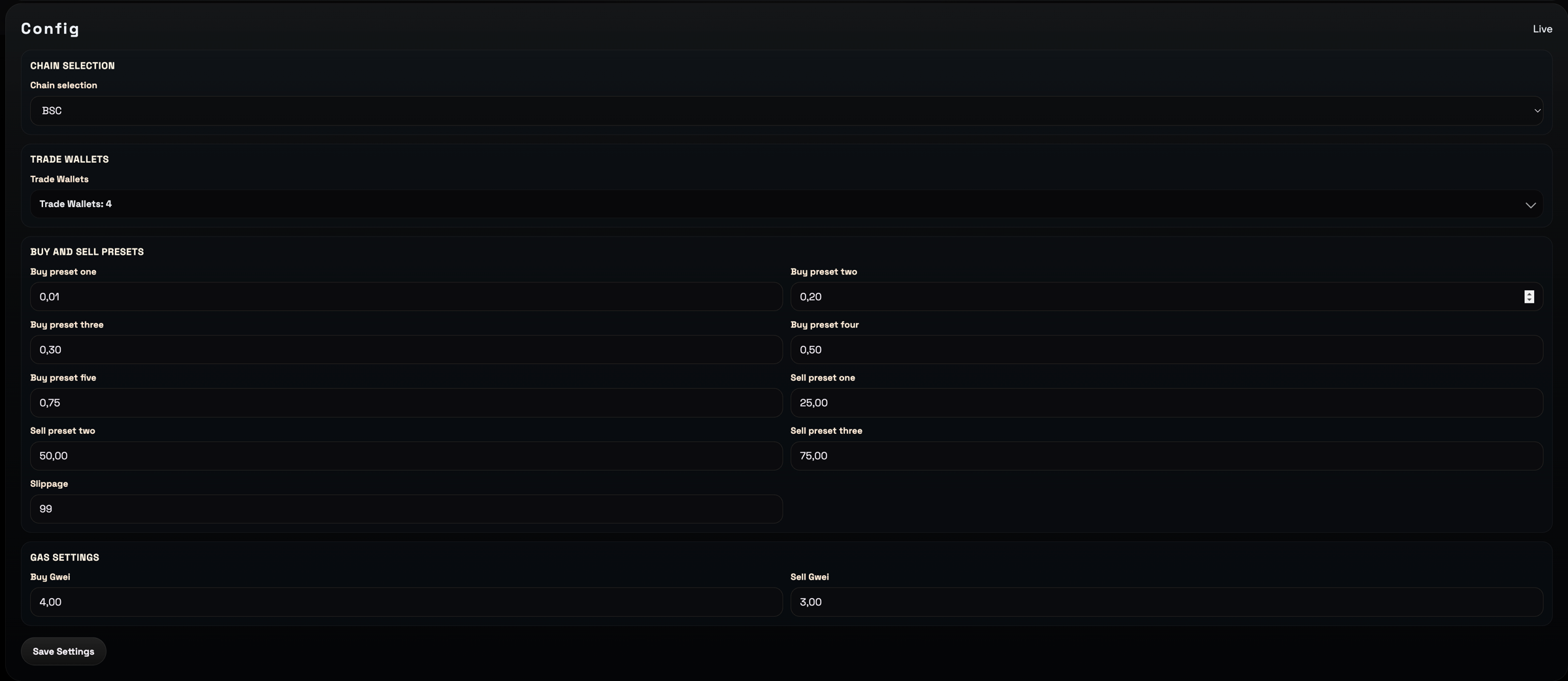
| Role | Capabilities |
|---|---|
| Chain Selection | Select the chain you want to configure settings for |
| Trade Wallets | Choose the wallets for trading. |
| Buy: 0.10 | Update the value of the initial preset Buy Button. Up to 3 decimals |
| Buy: 0.20 | Update the value of the initial preset Buy Button. Up to 3 decimals |
| Buy: 0.30 | Update the value of the initial preset Buy Button. Up to 3 decimals |
| Buy: 0.50 | Update the value of the initial preset Buy Button. Up to 3 decimals |
| Buy: 0.75 | Update the value of the initial preset Buy Button. Up to 3 decimals |
| Buy: 1.00 | Update the value of the initial preset Buy Button. Up to 3 decimals |
| Buy Gwei | Select the gas fee you wish to pay. Up to 3 decimal places. |
| Sell Gwei | Select the gas fee you wish to pay. Up to 3 decimal places. |
| Slippage: 15% | Choose your slippage percentage, entering a value up to two decimal places (e.g., 25.50). |